
🎯 Hint: Ask Breeze any questions and tell it to pull Knowledge Base Articles so that it has the latest relevant context.
How to use Breeze Assistant
Breeze Assistant is HubSpot’s conversational assistant. Use it to ask how-to questions, summarise customer records, draft messages and help with everyday work. Simply describe what you need in plain language.
Start with a simple request
-
Open Breeze Assistant. HubSpot’s documented entry point is in the top navigation bar.
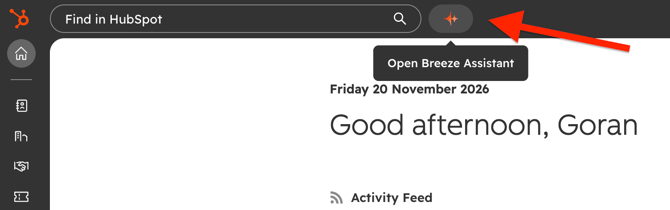
- You also can start it from the bottom floating window. The window can be closed if you want
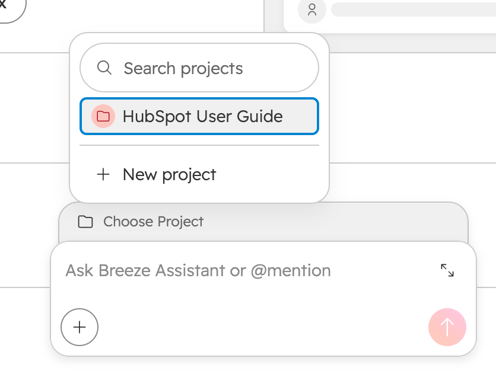
Type your request or choose a suggested prompt, then send it. - Add detail when prompted so Breeze can identify the right record or understand the task.
- Refine the result with a follow-up, such as “Make this shorter” or “Put this into bullet points.”
Prompts to try
-
**Learn HubSpot:** “How do I connect my calendar to HubSpot?”
-
**Understand a customer:** “Summarise the notes for [company name or domain].”
-
**Draft a message:** “Draft a friendly follow-up to [contact name] about [topic]. Keep it under 150 words.”
-
**Improve your writing:** “Rewrite this paragraph in clear, simple language: [paste text].”
Get better results
Include **what you want, who or what it relates to, and the format you need**. For example:
“Summarise the notes for [company domain] from the last 30 days. Use five bullet points and highlight any agreed next steps.”
If Breeze uses the wrong information, specify the record or source it should use and ask it to try again. Review any linked sources and check names, dates and details before using the answer or sending drafted content.
Ensign Specific Guideline
Use the pre-built Project "HubSpot User Guide" when you want to use relevant knowledge base information. Breeze can go through and find answers that you may want.
**Access note:** Available actions depend on your user access and account configuration. Preparing for upcoming appointments requires a connected calendar. If Breeze cannot access information you need, you may have limited access to some records.
Related: HubSpot general "Use Breeze" Knowledge base article